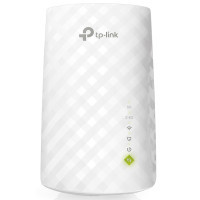
Wi-Fi amplification in dead zones Install the RE220 between the router and client devices to increase the Wi-Fi coverage area and eliminate dead zones. Two bands will provide a total bandwidth of up to 750 Mbit/s on an area of up to 300 m², as well as a suitable channel for watching streaming HD video, online games and other demanding tasks. Two bands for a large number of devices Wi-Fi AC standard allows you to create faster and more reliable Wi-Fi connections throughout the house and reach Wi-Fi speeds of up to 750 Mbit/s. The 2.4 GHz and 5 GHz bands allow you to connect up to 32 devices to Wi-Fi, ensuring a stable connection on all connected devices. Easy two-step installation Step 1: Press the WPS button on the router and on the RE220 to connect the amplifier to the network, or connect the amplifier via the Tether app or web interface if the router does not have WPS. Step 2: Place the amplifier in a place with optimal Wi-Fi coverage, guided by a smart indicator. Access point and Wi-Fi adapter Ethernet port RE220 will allow you to easily turn a wired Internet connection into a wireless access point. It can also work as a Wi-Fi adapter for connecting wired devices. High-speed mode for maximum performance High-speed mode uses one dedicated Wi-Fi frequency as a transit connection (Backhaul) and the other as an access point to increase bandwidth in an extended Wi-Fi network. Universal compatibility The RE220 is compatible with any existing Wi-Fi router or access point, making it easy to expand your Wi-Fi network and improve its signal no difficulties.
Characteristics
- Manufacturer
- TP-Link
- Features
- кнопка wps
- Country of manufacture
- Китай
- Dimensions
- 110.0 x 65.8 x 75.2
- Additionally
- 2.4 & 5GHz
- Number of antennas
- 3
- Number of ports
- 1x10/100TX
- Wi-Fi standard
- 802.11 a/b/g/n/ac
- Security features
- протокол WPA-2
Loading...