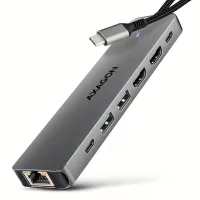
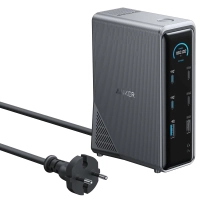
Premium 14-in-1 docking station for organizing a modern workspace, charging devices and connecting all necessary peripherals through one solution. 14-in-1 for maximum productivity ANKER Prime Charging Docking Station combines all the necessary interfaces to create a full working space and connect a large number of devices: 1 x USB-C Upstream (10 Gbit/s, laptop charging up to 100 W) 2 x USB-C Data (up to 10 Gbit/s) 2 x USB-C Charging (up to 100 W) 1 x USB-A Data (up to 10 Gbit/s) 3 x USB-A Data (up to 480 Mbit/s) 2 x HDMI 2.0 (up to 4K@60Hz) 1 x Gigabit Ethernet (RJ45, up to 1000 Mbit/s) 1 x combined audio jack 3.5 mm 1 x USB-A Charging (up to 12 W) Such equipment allows you to simultaneously charge devices, connect peripherals, work with high-speed drives and use two external monitors for maximum productivity. Support for two displays The docking station allows you to connect two external monitors at the same time with a resolution of up to 4K at 60 Hz, providing comfortable multitasking and an expanded workspace. Intelligent display Built-in display provides instant access to important information: current power level; device connection status; important messages and notifications. This allows you to always monitor the status of connected devices and the efficiency of the docking station. Frequently Asked Questions (FAQ) - ANKER Prime Charging Docking Station 14-in-1 (A83B63A1) Q1: How do I know if my laptop is compatible with the docking station? The docking station works with laptops that have a USB-C port that supports DisplayPort Alt Mode and Power Delivery. This applies to devices based on Windows 10/11, macOS 12 or later, and ChromeOS. Important: If the laptop does not support DisplayPort Alt Mode, video output through the docking station will not work. If there is no Power Delivery support, charging through the docking station will not be available. Q2: Is it possible to extend the desktop to two monitors with a MacBook? Due to the limitation of macOS and iPadOS, connecting two monitors through this docking station can only work in mirroring (SST) mode. Windows devices support both SST and MST (Multi-Stream Transport), which allows you to use two independent screens. Q3: Can I connect the monitor through the USB-C port of the docking station? No. The USB-C ports of this device do not support video output, so monitors are connected exclusively via HDMI. Q4: How to update the firmware via Anker Dock Manager? If a new firmware version is available: a notification (red dot) will appear in the Anker Dock Manager app; open the guide and perform the update step by step. Q5: What do Smart Mode and Custom Charging Mode mean? Smart Mode - automatically distributes optimal power between connected devices. Custom Mode — allows you to manually set charging priorities: Power Priority — increased power; Power Saving — reduced power; Balanced — a balanced distribution. Q6: Why does the power bank show a different input power than the display of the docking station? The difference may be due to: the needs of the connected devices; energy losses during cable transmission. Q7: Why is the data transfer rate not displayed? The docking station does not have access to the system indicators of the device, so the actual data transfer rate cannot be displayed in real time. Q8: What does the message about the increased temperature mean? This is a signal about a temporary reduction in power to cool the device during high load. Recommendations: ensure ventilation of the docking station; do not block the cooling holes. The message disappears automatically after the temperature stabilizes.
Characteristics
- Manufacturer
- Anker
- Country of manufacture
- Китай
- type
- зовнішній
- Connection interface
- USB Type-C
- Additionally
- з блоком живлення
- Output connectors
- 3.5 mm (mini-jack)
Loading...