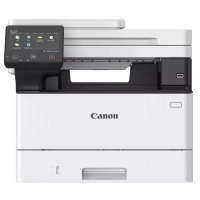
Optimize work processes and increase efficiency
Devices of the i-SENSYS MF460 series will enable your employees to save valuable time and increase productivity. Appreciate fast printing and scanning and easily protect your devices from hacking and virus threats.
Document Protection
A comprehensive security system provides complete protection for documents, device and network. Security options include TLS1.3, system startup verification, and PIN printing.
Ease of use
Appreciate the ease of printing and scanning tasks with easy-access buttons. Drag and drop icons to personalize the on-screen interface and easily complete everyday tasks.
Increased efficiency
Save valuable time with print speeds of up to 36 ppm, scan speeds of up to 100 images/min and a warm-up time of 14 seconds. Control your printer with Microsoft's Universal Print.
Collaboration on cloud platforms
Explore the possibilities of cloud collaboration using built-in connections to cloud storage services, including Google Drive, Dropbox and OneDrive.
Space-saving
Compact design allows you to easily place the device on desktops and shelves, effectively using all available office space space.
Mobile printing
Appreciate the convenient printing of documents from a smartphone or tablet using the Canon PRINT Business application, AirPrint (iOS) or Mopria (Android).
Devices of the i-SENSYS MF460 series will enable your employees to save valuable time and increase productivity. Appreciate fast printing and scanning and easily protect your devices from hacking and virus threats.
Document Protection
A comprehensive security system provides complete protection for documents, device and network. Security options include TLS1.3, system startup verification, and PIN printing.
Ease of use
Appreciate the ease of printing and scanning tasks with easy-access buttons. Drag and drop icons to personalize the on-screen interface and easily complete everyday tasks.
Increased efficiency
Save valuable time with print speeds of up to 36 ppm, scan speeds of up to 100 images/min and a warm-up time of 14 seconds. Control your printer with Microsoft's Universal Print.
Collaboration on cloud platforms
Explore the possibilities of cloud collaboration using built-in connections to cloud storage services, including Google Drive, Dropbox and OneDrive.
Space-saving
Compact design allows you to easily place the device on desktops and shelves, effectively using all available office space space.
Mobile printing
Appreciate the convenient printing of documents from a smartphone or tablet using the Canon PRINT Business application, AirPrint (iOS) or Mopria (Android).
Characteristics
- Manufacturer
- Canon
- They are also looking for
- 3 в 1
- Color
- білий
- Country of manufacture
- Тайвань
- Purpose
- для малого офісу
- RAM
- 1 Гб
- Width
- 420 мм
- height
- 373 мм
- The depth
- 460 мм
- weight
- 16.3 кг
- Interfaces
- Wi-Fi
- Display type
- кольоровий
- Noise level
- 49 дБ
- Printing technology
- лазерна
- Maximum print format
- A4
- Maximum resolution, dpi
- 1200 х 1200
- Print type
- монохромний
- Paper density
- 60 - 199 г/м²
- Supported paper sizes (main tray)
- Legal
- Compatible original cartridge
- Canon 070
- Resolution of color scanning
- 16/8 біт
- Scan bit rate with shades of gray
- 16/8 біт
- Monochrome printing speed
- 36 ст/хв
- Number of trays for serving
- 1
- Capacity of feed trays
- 250 аркушів
- Output tray capacity
- 150 аркушів
- Processor frequency
- 1200 МГц
- Support for direct printing technologies
- Wi-Fi Direct
- Monthly print volume
- 80 000 стор
- Supported OS
- Windows
- BFP type
- лазерний
- First page output time
- 5 сек
- Additional functions when printing
- прямий друк з USB-накопичувача
- Resolution when copying, dpi
- 600 x 600
- Maximum number of copies
- 999 шт
- Scanner type
- планшетний
- Optical resolution of the scanner
- 600 х 600
- Display options
- 5 "сенсорний
- Maximum monochrome copying speed
- 36 ст/хв
- Automatic two-sided printing module
- так
- Touch display
- є
- Scaling
- 25 - 400 %
- Time of release of the first copy
- 8 сек
Loading...
Related products
-1%