iNeXT
SKU:: NXT-013
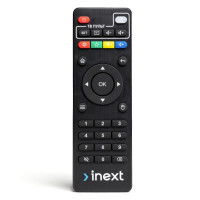
iNeXT universal remote control for TV5/TV5 ultra/TV4/4K ultra/TV3/4K2 inext RCU inext (NXT-013)
119 ₴
Universal remote control with programming zone for: inext TV5, TV5 Ultra, TV4, 4K Ultra, TV2e, TV3, 4K2
Main characteristics:
- Dimensions, weight: 45 x 20 x 140 mm, 55 g
- Compatible technology: Smart set-top boxes
- Type: Universal remote control
- Color: Black
- Communication channel: Infrared
- Radius, m: 10
- Number of programmable buttons: 5
Programming buttons for TV control
- Enter the remote control programming mode by pressing the white "POWER" button in the "TV REMOTE" section. Press and hold the white "POWER" button (about 5 seconds) until the indicator stops flashing and is constantly lit in red.
- Select one of those buttons in the "TV REMOTE" section of the inext remote control to which you need to record a command, press it once and release it, the indicator will start flashing, now the remote control is ready to receive an IR signal for recording.
- Directing the IR diodes of the two remotes (from the TV and from inext) at each other at a distance of about 1-2 cm, press once on the TV remote the desired button whose function you want to transfer. If the command was accepted, the indicator on the inext remote will flash three times quickly and start to light continuously, which means that the command has been recorded.
- Repeat steps 2-3 for all the buttons you want to program.
- If you have written down all the commands and want to exit the programming mode, press the "OK" button in the center of the control panel.
Characteristics
- Manufacturer
- iNeXT
- Color
- чорний
- Country of manufacture
- Китай
- Compatibility
- медіаплеєр
Loading...